The marks tab
The tab appears only in a font that has marks in it, and is named for them: Nikud, Accents, or Nikud & accents. To have it, tick Hebrew nikud or Western European accents when you start the font.
Draw the marks like any other character, on a sheet or with the brush. They come out small; that is right.
Test pointed text
Type into Pointed text (or Accented text) and see your font set it, placed by the browser exactly as any app will. Characters not drawn yet show in a fallback font.
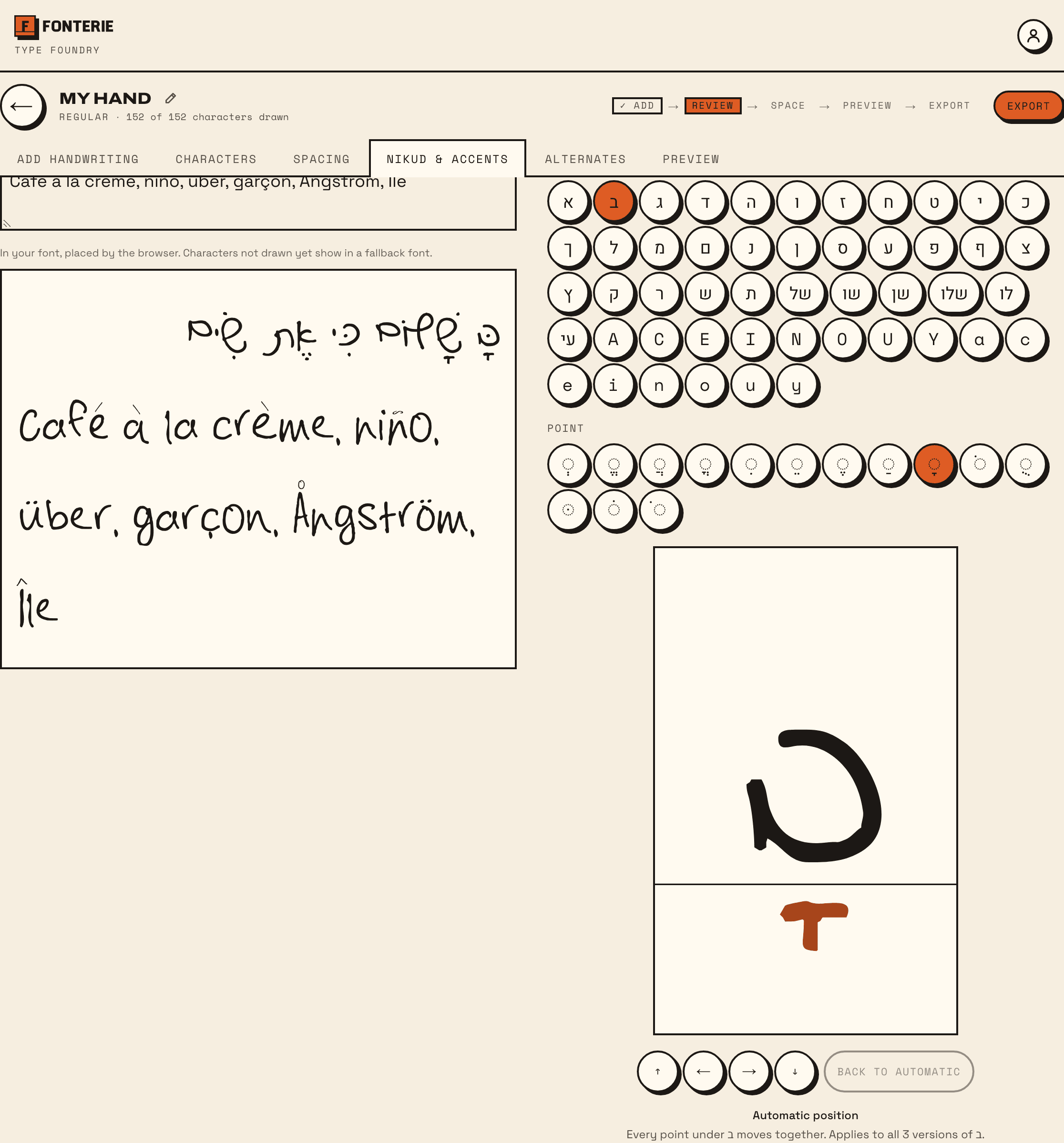
Move a mark
- Under Place a point by hand, pick the Letter and the Point (or the Accent).
- Drag the mark where it belongs, or move it with the arrow keys; Shift takes bigger steps. It now says Placed by hand.
- Check the text above again: every word with that mark on that letter has moved with it.
Some marks move together: every point under a letter shares one place, while the dagesh and the shin dot move on their own. The tab says which. The place applies to every version of the letter.
Back to automatic
Back to automatic returns the mark to where Fonterie would put it. Do this after redrawing a letter, so the place follows the new drawing.